
How to avoid package End of Life through backporting

Lidia Luna Puerta
on 23 January 2026
Tags: backporting , Enterprise Support , EOL , Ubuntu Pro
In July 2025, git received CVE-2025-48384, a high vulnerability allowing arbitrary code execution when cloning repositories. The US Cybersecurity and Infrastructure Security Agency added it to their Known Exploited Vulnerabilities catalog after confirming active exploitation in the wild.
If your Ubuntu system had already passed the End of Standard Support when this vulnerability was disclosed, you faced a choice: subscribe to Ubuntu Pro for the security patch, or continue running git with a known remote code execution vulnerability on your developer workstations and CI/CD infrastructure.
This scenario highlights a critical decision point: how do you maintain security when packages lose standard support? This blog explores your options and how Canonical’s backporting strategy helps you stay protected.
The impact of End of Standard Support
Support lifecycle directly affects your system security. Although Canonical maintains LTS releases for extended periods, there inevitably comes a point where decisions are required to avoid running unsecured packages.
When Ubuntu 20.04 LTS reached End of Standard Support in April 2025, thousands of packages in the main repository lost free security maintenance. A typical enterprise server runs around 800 packages, which almost guarantees that some packages will no longer be covered by free security updates.
Understanding End of Standard Support vs End of Life
Here’s what many users misunderstand: End of Standard Support and End of Life are different concepts for Canonical built and supported packages.
Canonical provides two types of security coverage. The first is standard security maintenance, which lasts 5 years and provides free security updates for packages in the main repository only. Universe repository packages never receive free security updates, even during this period.
After 5 years, main repository packages stop receiving free updates but remain functional. Security patches continue to be developed and released for another 10 years through Ubuntu Pro subscriptions, the second type of coverage, covering both main and universe repositories.
End of Life occurs at the 15-year mark, when the Ubuntu Pro period with legacy add-on concludes. Only then do security patches stop being developed entirely.
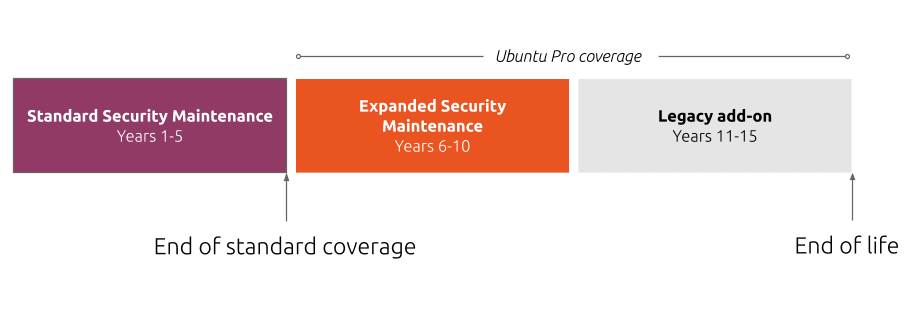
If you’re running Ubuntu and want to check your current support status, you can easily do this via the terminal:
pro security-statusThis shows which packages have active security coverage and which represent potential vulnerability exposure in your infrastructure.
What are the actual risks?
The dependency problem significantly compounds the risk. When package A depends on package B, which depends on package C, an unsupported package anywhere in that chain creates vulnerability across your entire stack. Research from Endor Labs analyzing software packages found that 95 percent of all vulnerabilities are found in transitive dependencies, meaning most security risk in your software supply chain is indirect.
Systems without security updates remain vulnerable to every threat disclosed after support ends. The git vulnerability demonstrates how attackers exploit publicly documented weaknesses. Malicious repositories become attack vectors for remote code execution on developer workstations and CI/CD systems.
Beyond immediate security exposure, organizations face tangible compliance and operational consequences. The EU Cyber Resilience Act, which applies from December 2027, requires manufacturers to provide timely security updates throughout a product’s lifecycle. Frameworks like FedRAMP, FISMA, and HIPAA require FIPS-140 certified cryptographic modules, while PCI-DSS mandates current security patches and vendor support. Running unsupported packages puts organizations at risk of failing these regulatory requirements. Organizations also face compatibility issues when newer packages expect updated dependencies and limited support when troubleshooting production incidents.
Your options when standard support ends
- Upgrade to a newer LTS release
Upgrading moves your infrastructure to an LTS version within its 5-year standard support window. This restores free security updates for packages in the main repository and eliminates the support gap for those packages.
This approach works well when you have resources to test deployment thoroughly, your applications are compatible with the newer release, and you have time for comprehensive validation. The challenge is that major upgrades carry real costs and risks. Version jumps can break compatibility, require application changes, or introduce dependencies that need extensive testing before production deployment.
- Enable Ubuntu Pro for expanded security maintenance
Enabling Ubuntu Pro on your infrastructure extends security coverage from 5 years to 15 years for packages in both main and universe repositories. This allows you to continue running your current release while receiving backported security patches. Canonical’s security team actively scans, triages, and backports critical, high, and select medium CVEs to all maintained LTS releases.
The backporting strategy means Canonical applies security fixes to your current package versions rather than forcing major upgrades. You receive vulnerability patches without the breaking changes that come with major version jumps or the re-certification requirements that disrupt tightly controlled compliance environments.
Ubuntu Pro covers thousands of packages across main and universe. For organizations requiring the full 15-year support window, the legacy add-on becomes available after 10 years of coverage at 50% above the standard Ubuntu Pro subscription cost. We recommend this approach for organizations seeking cost-effective security and compliance. Ubuntu Pro offloads much of the vulnerability management effort while providing comprehensive coverage across open-source packages with simple, predictable pricing.
Read about Canonical’s technical approach to security backporting and long term maintenance in our documentation at ubuntu.com/security/esm.
- Run without security updates
Though not recommended, you can consciously choose to run packages without active support. This might be considered when the package handles genuinely non-critical functionality, the system operates in complete isolation from network exposure, or strong compensating controls effectively mitigate the vulnerability risk.
Be explicit about this choice and thoroughly document it. Maintain a register of unsupported packages with clear business justification, documented risk assessment, and regular review schedules. This will help you audit your system much faster in the future. What represents acceptable risk today may not remain acceptable as the threat landscape evolves and new attack patterns emerge.
Running without support through ignorance or inertia differs fundamentally from making a conscious risk acceptance decision with appropriate governance and executive approval.
How expanded security maintenance works
Canonical’s security team monitors for vulnerabilities daily and evaluates their impact on supported packages. When vulnerabilities affect packages under Ubuntu Pro coverage, engineers apply available upstream patches or backport security fixes from newer versions to your maintained release. Updates undergo rigorous testing to verify stability and compatibility before becoming available through standard package management.
For embargoed vulnerabilities like the recent git security issues, Canonical prepares fixes in advance and releases them precisely when the embargo lifts, ensuring you’re protected the moment the vulnerability becomes public knowledge.
This approach means you don’t face a forced choice between security and operational stability. You maintain your current, tested environment while receiving necessary security patches that preserve compatibility.
How to choose the right approach after End of Standard support
LTS release support timelines are predictable. Ubuntu 20.04 released in April 2020 and reached End of Standard Support in April 2025, exactly 5 years later. Begin planning at least 6 months before standard support concludes. This gives you time to audit affected packages, test upgrade paths, secure budget, and coordinate infrastructure changes. Strategic planning prevents emergency decisions under pressure.
Your decision depends on risk tolerance, compliance requirements, engineering capacity, and budget. Most enterprises use a combination approach. Overall, our suggestions are as follows:
- You should choose to upgrade your LTS when you can test thoroughly, your stack supports the next LTS, and staying current aligns with your strategy.
- Choose expanded security maintenance when you need stability, lack upgrade resources, or require patches without version mandates.
- You should only accept running without updates if you can reasonably maintain minimal risk exposure, can implement strong compensating controls, and have explicit documented approval.
- The worst outcome is no decision at all, allowing support coverage to lapse through inaction.
What should you do today?
Run pro security-status to assess your current coverage. Identify which packages will lose standard support and when.
For Ubuntu 20.04 or earlier, standard support has ended. Those systems need decisions now.
Explore Ubuntu Pro options at ubuntu.com/pro or contact our team to discuss your requirements.
Read more:
Talk to us today
Interested in running Ubuntu in your organisation?
Newsletter signup
Related posts
When an upstream change broke smartcard FIPS authentication – and how we fixed it
This is the story of how Canonical’s Support team provided bug-fix support: we tracked down an upstream change in OpenSC that inadvertently broke FIPS...
How to build DORA-ready infrastructure with verifiable provenance and reliable support
DORA requires organizations to know what they run, where it came from, and how it’s maintained. Learn how to build infrastructure with verifiable provenance.
The $8.8 trillion advantage: how open source software reduces IT costs
Open source software is known for its ability to lower IT costs. But in 2025, affordability is only part of the story. A new Linux Foundation report, The...